From Fixed MP3 to
Registered Copyright & Every Royalty Paid.
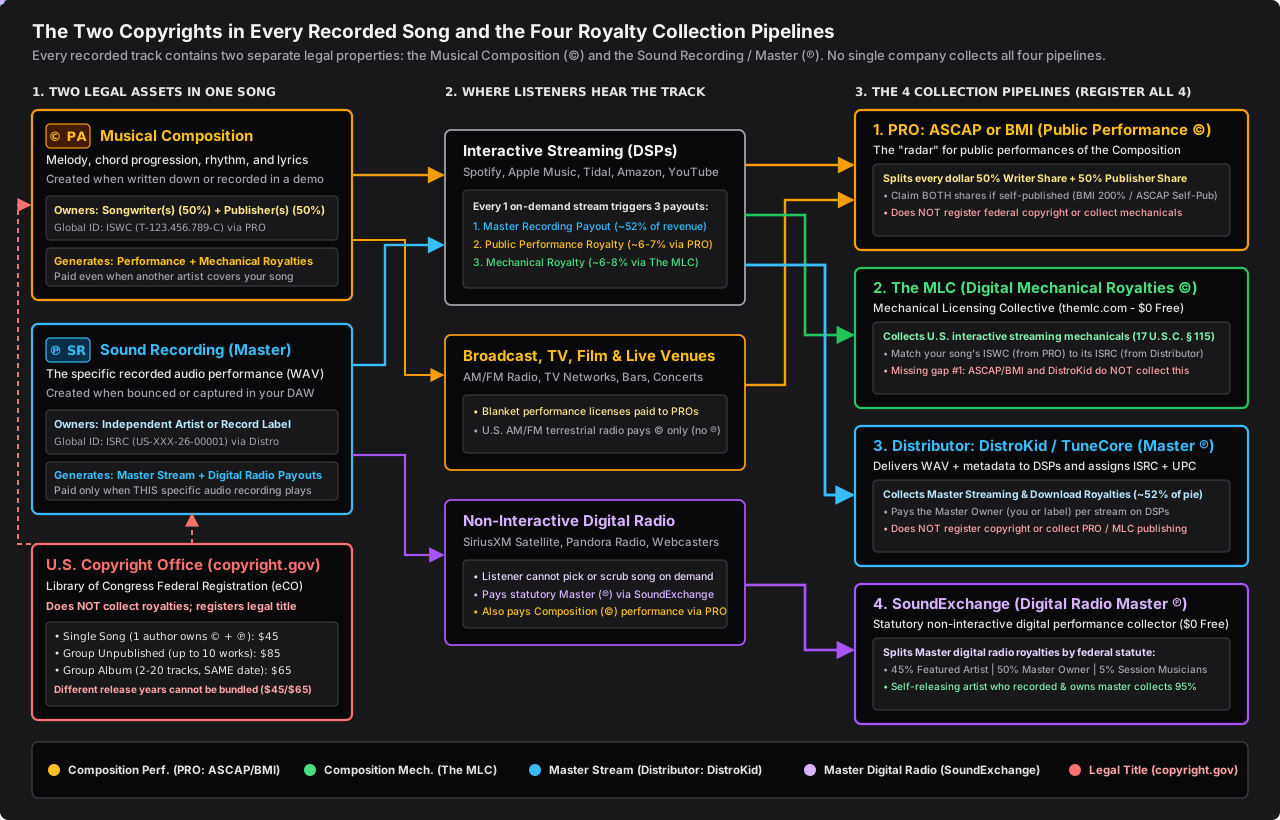
Bouncing an MP3 or WAV to your hard drive makes your song copyrighted, but it does not register it with the U.S. Congress (copyright.gov). Uploading to DistroKid only collects your Master (℗) streaming share, while ASCAP and BMI only track Public Performance (©). Use our interactive A-to-Z release checklist and fee calculator below to close every gap across copyright.gov, PROs, The MLC, and SoundExchange.
How to Release a Song & Collect 100% of Your Royalties
Every recorded song contains two distinct copyrights: the Musical Composition (©) and the Sound Recording / Master (℗). Walk through the interactive tools below to register your copyright properly and connect every royalty pipeline.
"Fixed on a Hard Drive" vs. Registered with the U.S. Congress
Legally, your song is copyrighted the second it is fixed in a tangible medium: bounced as an MP3 or WAV on your computer hard drive, saved to a USB stick or CD, or recorded into a voice memo. But an unregistered copyright has severe blind spots if someone steals your song or disputes ownership.
1. Automatic Copyright (Unregistered Fixed Media)
How you get it: Bounce an MP3/WAV to your hard drive, USB, or CD ($0 · Automatic under 17 U.S.C. § 102)
- •What proof you have: Your own hard drive files, DAW session timestamps, lyric notebooks, drafts, or emails.
- ✕Barred from Federal Court (§ 411(a)): You cannot file a copyright infringement lawsuit in federal court until the U.S. Copyright Office issues a registration certificate.
- ✕You could still lose a dispute: Without timely registration, there is no automatic legal presumption that you are the valid owner; you must prove chain of creation from scratch.
- ✕No Statutory Damages or Attorney's Fees (§ 412): If infringement happens before you register, you must pay your own lawyer out of pocket and can only sue for provable actual damages.
2. Federally Registered Copyright (Library of Congress)
How you get it: File online at copyright.gov ($45 to $85) before release or within 3 months of publication
- ✓Public Federal Record: Official Certificate of Registration (PA, SR, PAu, or SRu) on file with the U.S. Copyright Office (Library of Congress).
- ✓Prima Facie Presumption (§ 410(c)): In court, your registration certificate is legally presumed valid, shifting the burden of proof onto the other party.
- ✓Statutory Damages (§ 504(c)): Eligible for $750 to $30,000 per song (and up to $150,000 per song for willful infringement) without having to prove the infringer's profits.
- ✓Recovery of Attorney's Fees (§ 412): Forces a losing infringer to pay your legal fees, giving entertainment attorneys real leverage to enforce your rights.
U.S. Copyright Office Strategy: Package Deal vs. Per-Song Filing
Up to 10 unreleased songs can be bundled on one $85 GRUW application (1 filing for 10 songs), even if the songs were written in different years, as long as none of them have been published on Spotify, Apple Music, or YouTube yet and all share the same author(s).
The 6-Step A-to-Z Song Release & Royalty Checklist
Bounce Master Audio & Sign a Split Sheet (Copyright Fixation)
Export your 24-bit WAV master, instrumental, and stems. Saving the audio to a hard drive, USB drive, or CD legally 'fixes' the song in a tangible medium (17 U.S.C. § 102), creating automatic copyright. Have all co-writers and producers sign a written Split Sheet listing legal names, PRO (ASCAP or BMI), IPI numbers, Composition (©) %, and Master (℗) %.
Register with the U.S. Copyright Office (Library of Congress)
File online at copyright.gov. If you have 2 to 10 finished, unreleased songs, file a Group of Unpublished Works (GRUW, $85 total) BEFORE uploading to DistroKid. If releasing 1 song you wrote and recorded alone, file a Single Application ($45 covering both © and ℗).
Upload Master to Your Digital Distributor
Upload your 24-bit WAV, 3000x3000 cover art, songwriter legal names, and release date. Once processed, copy the 12-character ISRC assigned to each recording (for example, US-S1Z-26-00001). You need this ISRC for Steps 4, 5, and 6.
Register the Work with Your PRO (Claim Writer + Publisher Shares)
Register the song title, co-writers' IPI numbers, and paste the ISRC from Step 3. Every public performance royalty is split 50% Writer's Share + 50% Publisher's Share. If you are self-published, claim BOTH shares (200% on BMI's scale, or 100% Writer + 100% Publisher on ASCAP).
Link Your ISRC to Your ISWC in The MLC
Log in to your free Member account at themlc.com as a Self-Administered Songwriter. Find your composition by its ISWC and attach the distributor ISRC from Step 3 so Spotify and Apple Music streams match your songwriting catalog.
Register Your ISRC with SoundExchange as Artist + Rights Owner
Create a free account at soundexchange.com, select 'Both' (Featured Artist AND Sound Recording Copyright Owner), and submit your track metadata and ISRC from Step 3.
Why DistroKid Alone Leaves Nearly Half Your Money Behind
Simulate $9,950 of independent song revenue across interactive streaming, public performance, mechanicals, and digital radio. Click any pipe valve on the animated money funnel or toggle each card below to see what routes to your bank account versus what leaks into the unclaimed "Black Box" pool.
Animated Royalty & Copyright Flowcharts
Interactive Split Sheet Generator, Digital Sign-Off & Pre-Release Listening Session QC
Pre-Release Studio Listening Session & Sync Deliverable Checklist
A-to-Z Release & Catalog Services
Hands-on catalog organization, split sheet accounting, and royalty pipeline setup for independent artists, producers, and studio teams.
A-to-Z Song Release & Metadata Setup
Complete release pipeline setup connecting your distributor (DistroKid, TuneCore, CD Baby) ISRC and UPC codes to ASCAP/BMI, The MLC, and SoundExchange so no royalty stream sits unmatched.
Copyright Registration Strategy
Administrative workflow planning for U.S. Copyright Office eCO filings: choosing between Single ($45), Standard ($65), Group of Unpublished Works ($85 GRUW), and Album (GRAM $65) applications before and after release.
PRO Writer & Publisher Share Recovery
Self-published songwriter setup on ASCAP and BMI so independent writers collect both the 50% Writer's Share and the 50% Publisher's Share (200% BMI scale / 100%+100% ASCAP scale) alongside IPI and ISWC tracking.
The MLC & SoundExchange Audits
Catalog auditing to link every recording's ISRC to its composition ISWC inside The Mechanical Licensing Collective (themlc.com) and claim both the 45% Featured Artist and 50% Rights Owner shares at SoundExchange.
Split Sheets & Catalog Accounting
Clear co-writer and producer split sheet documentation separating Musical Composition (©) percentages from Sound Recording / Master (℗) percentages from Day 1.
Studio & Workstation Engineering
Custom studio hardware/software integration, multi-monitor control room workflows, and institutional studio operations powered by Midimaze and Build Forward Tech.
Studio Software & Education Platforms
We build and ship native macOS, Windows, and web tools for recording studios, educators, and multi-monitor workstations in partnership with Midimaze and Build Forward Tech Labs.
Midimaze Studio Ops & Curriculum
Interactive music business and recording arts curriculum, multi-room studio booking, gear inventory, score analysis, and animated explainers covering U.S. copyright, PROs, The MLC, and SoundExchange.
ScreenStage (Mac, Windows & Linux)
Every room remembers every screen. Automatically recognizes your home desk, recording studio, or classroom when you plug in, remembers every monitor and KVM TV, hides screens you aren't using, and switches layouts in one click.
QuietPlease (macOS 14+)
A real audio compressor detector running on your room microphone. Threshold, ratio, knee, attack, release, 4 live scopes, and 32-band sound training put a full-screen Quiet Please sign on every display when the room gets too loud.
TrackCascade (abletools)
Pro Tools-speed session setup inside Ableton Live: batch New Tracks dialog (.ablx) and pair-aware mono/stereo cascading hardware input and output routing (.amxd + CLI).
Built by Producers, Educators & Systems Architects
Most music business advice glosses over the exact registration mechanics that determine whether you get paid or can enforce your rights. Together with Midimaze and Build Forward Tech, we turn scattered industry rules into concrete checklists, calculators, and studio software.
- Clear, step-by-step release accounting from studio bounce to all 4 royalty pipelines
- Separates automatic 'fixed' copyright (17 U.S.C. § 102) from federal registration with the Library of Congress (copyright.gov)
- Closes the hidden royalty gaps DistroKid and PROs leave behind (The MLC mechanicals + SoundExchange digital radio)
- Published creator software (Midimaze, ScreenStage, QuietPlease, TrackCascade) built in affiliation with Build Forward Tech
- Built by active producers, recording arts educators, and systems architects
Need Help Auditing Your Catalog or Setting Up Your Release Pipeline?
Whether you are preparing your first single, registering a multi-year back catalog, organizing co-writer split sheets, or deploying studio software, send us a note below.
Explore the Full Interactive Course on Midimaze
Read all five lessons with animated signal flows covering Composition (©) vs. Master (℗), U.S. Copyright Office Circulars 4/55/58, ASCAP vs. BMI, and The MLC + SoundExchange.
Open Midimaze Music Business Module →